
Send Export Files to Additional Recipients Using CC

Rupali
Last Update hace 21 días
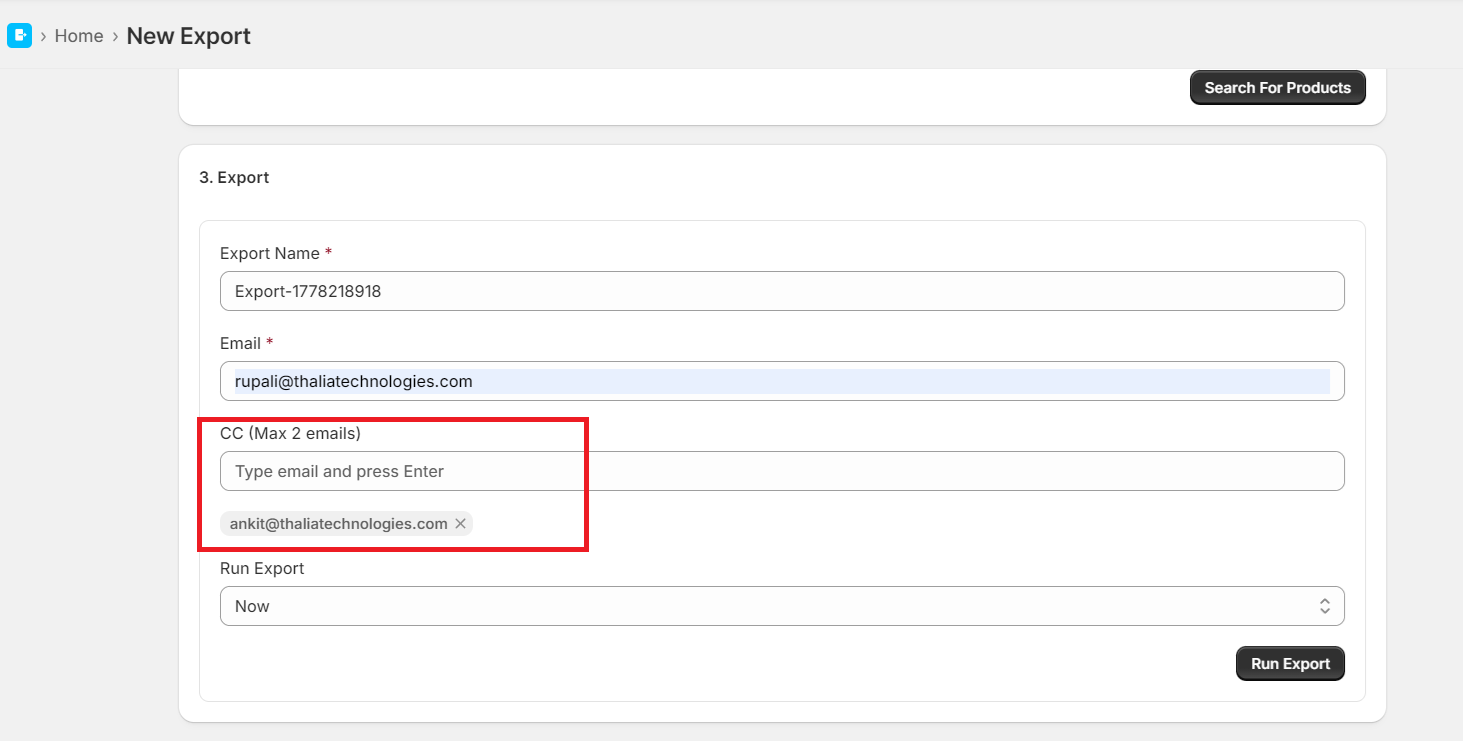
The Product Data Exporter app now supports adding up to 2 email addresses in CC while scheduling or sending export files. This enhancement makes it easier to share exported product data with team members, clients, or other stakeholders automatically.
- Navigate to the export configuration section.
- Enter the primary recipient email address in the Email field.
- In the CC field (Max 2 emails):
- Type the email address
- Press Enter to add it
- Repeat the same step to add a second CC email address.
Benefits of Using CC Emails: The CC feature is useful for:
- Sharing exports with multiple team members
- Sending reports to managers or clients automatically
- Keeping backup recipients informed
- Improving collaboration across departments
- A maximum of 2 CC email addresses can be added per export task.
- All entered email addresses must be valid email formats.
- CC recipients will receive the same export file as the primary recipient.
- The CC feature is available for both basic and pro plan.